Noida, India — October 29, 2026 — As organizations modernize their IT infrastructure, consolidate email platforms, and transition to cloud-based communication systems, email migration has become an important operational priority. Businesses must move large volumes of business correspondence while preserving attachments, folder hierarchies, and essential message information. SysInfoTools is addressing these requirements with a flexible approach to email migration that helps IT administrators, managed service providers (MSPs), and enterprise technology teams manage mailbox transfers across supported platforms.
Enterprise Email Migration Requires More Than Data Transfer
For organizations managing hundreds of employees, email migration involves several interconnected challenges. These include selecting compatible source and destination platforms, maintaining access to business-critical communications, handling authentication requirements, and minimizing disruption to everyday operations. A poorly planned transfer can leave teams searching for missing messages, duplicate records, or inconsistencies between original and migrated mailboxes.
The challenges become more complex during mergers and acquisitions, cloud adoption projects, departmental restructuring, employee account transitions, and email platform replacements. IT teams must also consider compliance requirements, internal recordkeeping policies, available storage, and the time required to verify migration results.
A structured migration process therefore needs more than a basic import function. Organizations benefit from tools that support selective transfers, multiple mailbox sources, appropriate authentication methods, and transparent progress reporting.
A Flexible Approach to Mailbox Migration
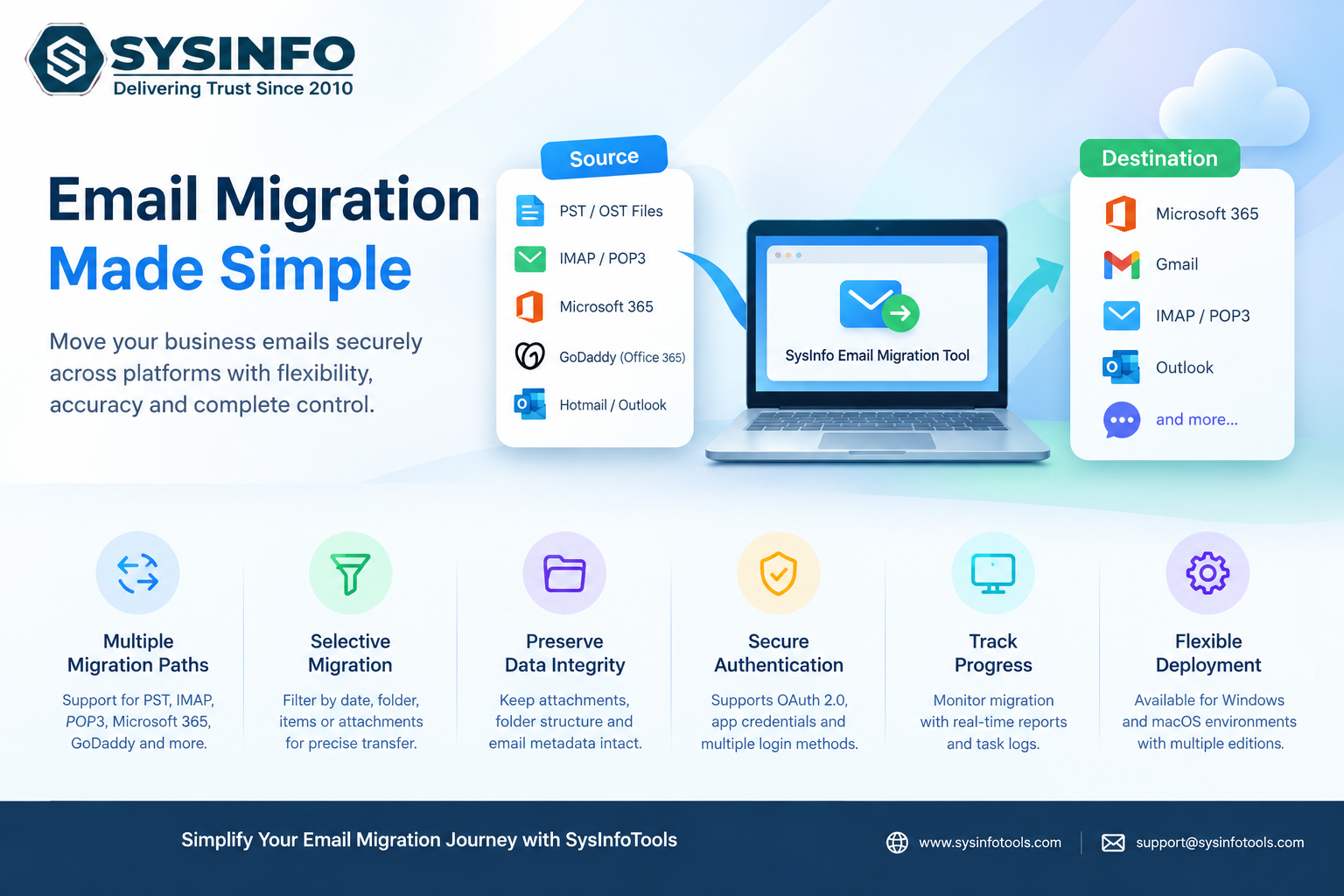
The SysInfo Email Migration Tool supports email migration workflows involving PST and OST files, IMAP and POP3 accounts, Microsoft 365, GoDaddy accounts using Office-based services, and Hotmail or Outlook accounts. Available destinations depend on the selected source and supported migration path, allowing users to plan transfers according to their existing infrastructure and operational requirements.
This flexibility can help IT professionals manage different migration scenarios without relying exclusively on separate procedures for every mailbox source. Businesses can evaluate compatible cloud destinations or export email data into supported local formats, depending on their migration, backup, and archiving objectives.
For organizations handling multiple IMAP or POP3 accounts, CSV-based account imports provide a way to organize batch processing rather than configuring every account individually. This can be particularly useful for service providers and administrators coordinating several mailbox transfers within a defined project schedule.
Selective Migration Helps Control Transfer Scope
Transferring every message is not always necessary. Some organizations need to move recent correspondence, preserve specific attachments, or migrate selected mailbox folders while excluding irrelevant information. Moving unnecessary data can increase processing time and complicate verification.
Available filtering options include date ranges, email item selection, attachment-related settings, and duplicate removal, depending on the selected migration route. These controls help administrators define the intended transfer scope before processing begins.
Selective migration can be valuable during phased cloud deployments, employee account changes, and projects involving legacy mailbox archives. By establishing clear selection criteria in advance, teams can better align migration activities with business requirements and reduce avoidable work.
Maintaining Mailbox Organization and Data Accessibility
Email messages frequently contain information that extends beyond their visible text. Attachments, message headers, folder names, and other supported details can be important for customer communication, internal investigations, project documentation, and business recordkeeping.
Maintaining an organized destination structure makes it easier for employees to locate previously stored conversations after a platform transition. Depending on the selected source and destination, the software supports folder and subfolder handling, attachment management, and migration to compatible email services or local file formats.
Supported export formats include PST, PDF, EML, MSG, MBOX, JSON, DOC, DOCX, and CSV for applicable workflows. These options can help organizations retain accessible copies of email information for archiving, review, and future reference.
However, migration teams should validate the required metadata, folder structure, and attachment handling during a pilot run before processing production mailboxes.
Visibility and Authentication for IT Administrators
Large migration projects require clear visibility into the work being performed. Administrators need to identify completed transfers, review skipped items, and investigate errors before considering a project finished.
The solution includes an active task panel for monitoring migration progress and reporting features for reviewing completed operations. These capabilities support a more organized verification process and give administrators a reference for identifying tasks that may require additional attention.
Authentication options vary according to the source platform and account type. Supported methods include standard IMAP or POP3 credentials, Microsoft OAuth 2.0 authorization, Microsoft tenant application credentials, and Google Workspace service-account authentication options for applicable workflows.
Organizations should configure permissions carefully, protect authentication credentials, and follow their internal security policies before starting a migration. Testing representative accounts and confirming destination access can also help identify configuration issues early.
Supporting MSPs and Enterprise Migration Planning
Managed service providers frequently coordinate migrations for customers with different email environments, mailbox sizes, and business priorities. A consistent workflow for account selection, filtering, progress monitoring, and post-migration review can help service teams manage these projects more systematically.
Enterprise IT departments can also benefit from a phased approach that begins with a limited pilot, followed by controlled migration batches and a final verification stage. This approach allows teams to assess compatibility, estimate processing requirements, and resolve unexpected issues before expanding the migration to the wider organization.
The software is available for supported Windows and macOS environments, with licensing editions designed for different usage requirements. Organizations can review the technical prerequisites, supported migration paths, and available trial limitations before selecting an appropriate deployment option.
About SysInfoTools
SysInfoTools develops software solutions for email migration, cloud backup, email recovery, and data management. Its solutions are designed to help individuals, IT professionals, and organizations handle email data across supported platforms and file formats.
Businesses planning an email migration can review the available features, compatibility requirements, and migration options on the official website before beginning their projects.
Explore the email migration solution: https://www.sysinfotools.com/mail-migration.php