Introduction
Migrating mailbox data from IBM Lotus Notes or HCL Notes to Microsoft Outlook requires careful preparation. NSF files can contain emails, attachments and organized folders that users need after migration. As Outlook does not support NSF files natively, users have to convert NSF to PST to access their mailbox data in Outlook.
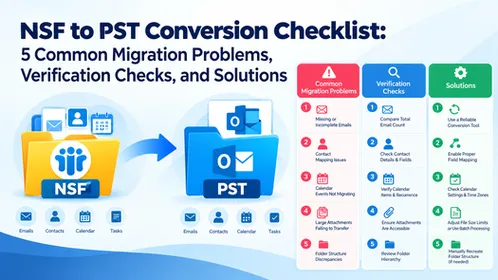
However, conversion can also involve problems, including missing emails, inaccessible attachments, changes in folder organization and difficulties accessing the resulting PST file. Users can identify these issues and validate the converted data to determine whether the migration was successful. This checklist covers five common NSF to PST conversion problems, including checks to identify them and practical solutions to resolve them.
Five Common Problems When Converting NSF to PST and How to Fix Them
□ 1. Emails Missing After Conversion
Some emails can be missing from the converted PST because particular source folders were not selected, files were skipped and the conversion was incomplete.
Verification Checks:
Compare important emails in the original NSF file and converted PST.
Check the Inbox, Sent Items, Drafts and any custom folders.
Compare message counts where possible.
Verify that all required NSF files were processed.
Recommended Solution:
Make sure you selected the correct source files and folders. If messages are still missing, check the conversion results and repeat the conversion for the affected data after identifying the cause.
□ 2. Attachments Are Missing or Cannot Be Opened
You might see emails in Outlook but be unable to access their attachments. This can affect important documents, photos and spreadsheets.
Verification Checks:
Open emails that originally contained attachments.
Confirm that the expected attachments are present.
Open selected transferred attachments to verify their accessibility.
Compare the affected messages with the original NSF mailbox.
Recommended Solution:
Make sure the conversion method you choose supports attachment preservation. If attachments are missing and damaged, check the source messages and conversion settings before processing the affected data again.
□ 3. Folder Structure Is Not Preserved
Lotus Notes mailboxes can contain nested folders and user-defined subfolders. If these are missing and arranged differently after conversion, users can have difficulty finding their emails.
Verification Checks:
Compare the original folder hierarchy with the converted PST.
Check whether important subfolders are present.
Verify that selected messages are in their expected locations.
Recommended Solution:
Choose a conversion method that supports the required folder structure. Review the available folder-selection options before conversion and verify the resulting hierarchy in Outlook.
□ 4. Email Dates and Message Details Have Changed
Differences in email dates, sender details, recipient information and message formatting can make it harder to locate and interpret older correspondence.
Verification Checks:
Compare the dates of selected emails.
Verify sender names, recipient details and subject lines.
Open messages containing formatted text and embedded images.
Check whether important message content remains readable.
Recommended Solution:
Compare the affected messages with their original versions and investigate whether the differences result from conversion, display settings and source-data issues. Use a method that supports the message properties and content required for your migration.
□ 5. The Converted PST File Does Not Open Properly
Even after conversion, the resulting PST file might fail to open in Outlook. Possible causes include an incomplete output file, access restrictions, or compatibility issues.
Verification Checks:
Confirm that the PST file exists in the selected destination.
Check whether the file is accessible.
Open it using a compatible Outlook version.
Review any error messages displayed during the process.
Recommended Solution:
Verify that the conversion finished successfully and that the output file was saved correctly. If the PST remains inaccessible, investigate the reported error and repeat the conversion after resolving the underlying issue.
How the Right Conversion Approach Helps Resolve These Problems
Selecting an appropriate NSF to PST conversion method such as Softaken NSF to PST Converter can help users address common migration difficulties. This solution supports the NSF files, preserves available email content and attachments, maintains folder organization where supported and generates PST files compatible with the intended Outlook environment.
After conversion, open the resulting PST in Outlook and verify emails, attachments, folder structure and important message details. These checks help identify discrepancies before the migrated mailbox is used for regular work.
Final NSF to PST Verification Checklist
Before considering the migration complete, confirm the following:
□ All required NSF files have been processed.
□ Important emails are available in Outlook.
□ Required attachments open correctly.
□ Expected folders and subfolders are present.
□ Email dates and message details have been checked.
□ The converted PST opens successfully.
□ Original NSF backups are retained until verification is complete.
Conclusion
NSF to PST conversion problems can affect mailbox accessibility, email completeness, attachment availability and folder organization. By checking the original and converted data, users can identify discrepancies and take corrective action before relying on the migrated mailbox.
Following this checklist and selecting a conversion method that meets your data requirements can make Lotus Notes to Outlook migration more organized and reliable. Always verify the resulting PST before considering the process complete.
Frequently Asked Questions (FAQs)
Q1. Why can emails be missing after NSF to PST conversion?
Ans. Emails can be missing because certain source files and folders were not selected, the conversion was incomplete and the source data had existing issues. Compare the original NSF mailbox with the resulting PST to identify the differences.
Q2. How can I verify attachments after converting NSF to PST?
Ans. Open emails that contain attachments and check whether the expected files are available and accessible. Compare any missing attachments with the original messages.
Q3. How do I confirm that my NSF to PST migration was successful?
Ans. Verify that important emails, attachments, folders and message details are available in Outlook. Confirm that the PST opens correctly and retain the original NSF files until the required data has been checked.