Email has become an important source of business communication and personal information. Yahoo Mail users may store years of customer discussions, invoices, project updates, service confirmations, and other correspondence in their accounts. While accessing these messages online is convenient, keeping important emails only inside a webmail account may not always meet documentation, sharing, or record-retention requirements.
Converting selected Yahoo emails into PDF files offers another way to organize and access email content. PDF is widely supported across operating systems and devices, making it suitable for reviewing, printing, sharing, and maintaining copies of important correspondence. However, a useful conversion process requires more than changing the file extension. Users should consider message formatting, attachments, folder organization, and the purpose for which the resulting documents will be used.
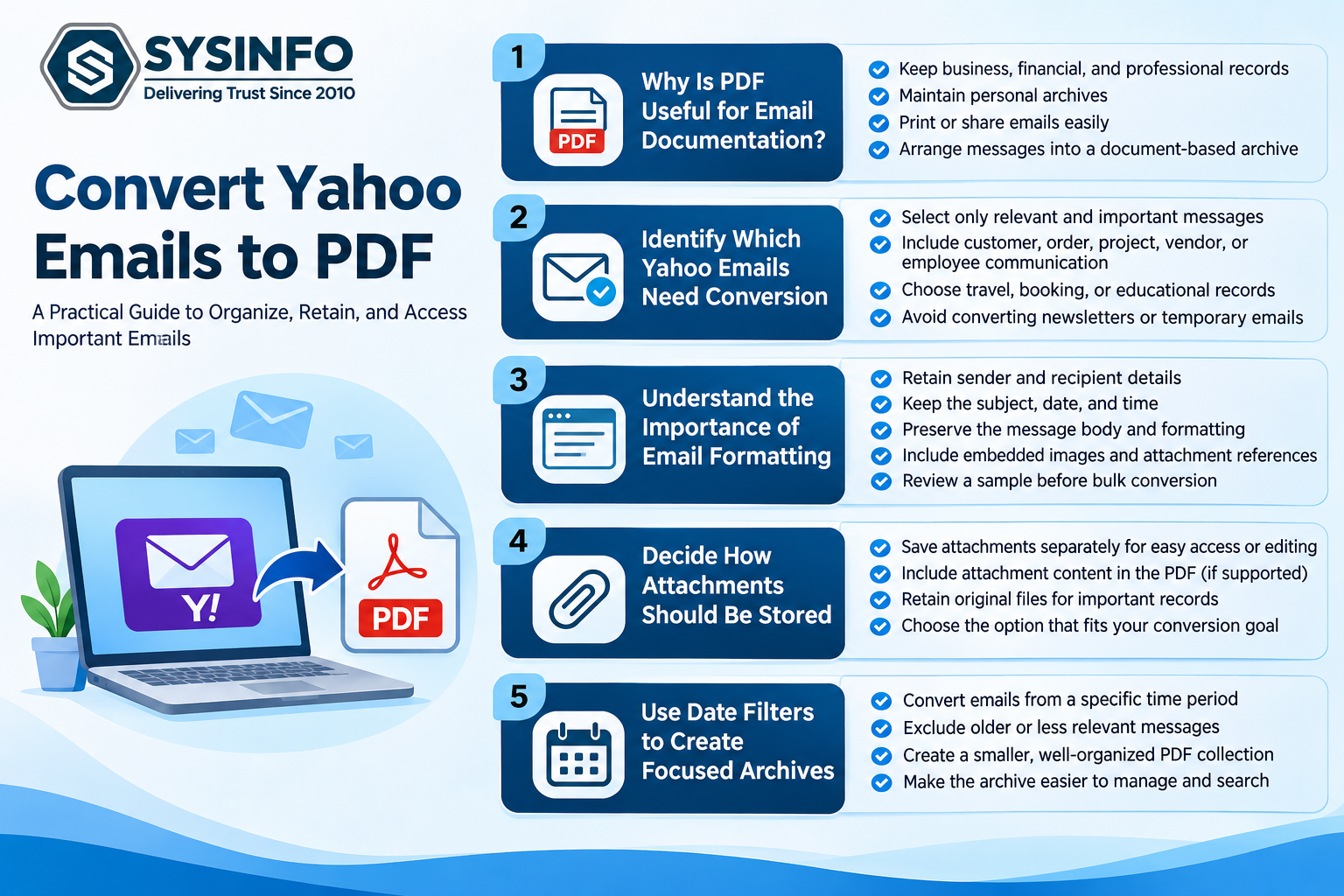
1. Why Is PDF Useful for Email Documentation?
PDF is commonly used when information needs to be presented in a consistent document format. Unlike an email that must be opened through a compatible mail service or client, a PDF can generally be viewed using standard PDF readers.
This makes the format useful in several situations:
Business documentation: Companies may retain customer approvals, order confirmations, and project-related conversations.
Financial records: Email discussions containing billing details, payment confirmations, or transaction references can be preserved for review.
Professional communication: Important instructions and agreements can be stored as documents for internal reference.
Personal archives: Users may want offline copies of travel confirmations, account notifications, and other significant messages.
Printing and sharing: PDF documents are convenient when email content needs to be printed or shared with someone who does not have access to the original Yahoo account.
A PDF copy can also make selected messages easier to arrange into a document-based archive. It does not replace the original mailbox, but it provides an additional way to retain and access important email information.
2. Identify Which Yahoo Emails Need Conversion
Converting an entire mailbox may not always be necessary. Many Yahoo accounts contain newsletters, promotional messages, automated notifications, and temporary conversations that have little long-term value.
A better approach is to identify the messages that need to be retained before starting the conversion.
For example, a business user might prioritize:
Customer complaints and their resolutions
Purchase orders and invoice discussions
Project approvals and delivery confirmations
Vendor communication
Employee-related correspondence
Important account and service notifications
Personal users may choose travel itineraries, booking confirmations, educational records, or correspondence they expect to reference later.
Selecting relevant messages reduces unnecessary files and makes the resulting archive easier to navigate. It also helps users avoid converting large volumes of unrelated content.
3. Understand the Importance of Email Formatting
An email contains several elements that contribute to its meaning. The message body is only one part of the record. Sender information, recipient details, subject lines, timestamps, and attachments may be equally important.
When converting Yahoo emails to PDF, users should check whether the resulting document retains the information required for future reference.
Important elements include:
Sender and recipient details
Email subject
Original date and time
Message body and formatting
Embedded images
Attachment references
Relevant conversation details
For example, a message confirming a payment may not be useful as a standalone record if its sender, date, or related attachment is missing. Reviewing sample output files before converting a large mailbox can help identify formatting or content issues early.
Users should also distinguish between embedded images and separate attachments. These may be handled differently during conversion, depending on the selected settings and the software being used.
4. Decide How Attachments Should Be Stored
Attachments often contain the most important information in an email. A message may refer to a quotation, spreadsheet, signed document, invoice, or image that provides context for the conversation.
There are different ways to handle these files when creating a PDF archive.
Save attachments separately: This approach keeps the original attachment files outside the PDF document. It can be useful when recipients need to open or edit the original documents independently.
Include attachment content in the PDF: Where supported, converting attachments into PDF can help bring related information into a document-based archive. However, users should verify the resulting output, particularly when attachments contain complex formatting.
Retain the original files: For important records, maintaining a separate copy of the original attachment is a sensible precaution. A converted document may not preserve every feature of the source file.
Before conversion, users should decide whether the objective is to create readable email records, preserve original attachments, or maintain both.
5. Use Date Filters to Create Focused PDF Archives
A Yahoo mailbox may contain thousands of messages accumulated over several years. Converting every message can create a large collection of documents that is difficult to manage.
Date-based filtering helps narrow the conversion to a relevant period. For instance, a business may want to preserve correspondence from a completed financial year, while an individual may need messages related to a particular project or travel period.
A practical archiving approach could involve:
Identifying the required retention period.
Selecting the relevant Yahoo mailbox folders.
Applying an appropriate date range.
Reviewing the selected messages.
Converting the required emails into PDF.
Checking the resulting documents before storing them.
This method helps create smaller, purpose-specific archives instead of one large collection containing unrelated messages.
6. Organize PDF Files for Easier Retrieval
Converting emails is only one part of the process. The resulting files should also be arranged so that users can find specific records without opening every document.
A consistent naming convention can make a substantial difference. For example, files can be organized by department, project, year, or customer reference.
A business archive might use folders such as:
Customer Correspondence
Vendor Communication
Financial Records
Project Approvals
Employee Documentation
Archived Notifications
Users should also consider storing the files in an appropriate location with access permissions based on the sensitivity of the information.
PDF documents may be easier to distribute than mailbox data, but they can still contain confidential business or personal details. Access control, encryption, and secure storage should therefore remain part of the archiving process.
7. Manage Large Mailboxes and Multiple Yahoo Accounts
Users who manage more than one Yahoo account may face additional challenges. Manually logging in to each account, selecting folders, and converting messages separately can increase the time required for larger projects.
A suitable Yahoo to PDF converter should therefore be evaluated for its ability to process multiple accounts, select specific folders, apply filters, and handle repeated messages.
The SysInfo Yahoo to PDF Converter(https://www.sysinfotools.com/converter/yahoo-to-pdf.php) provides single-account and batch processing options, including CSV-based account entry. It supports converting multiple Yahoo mailbox emails into PDF and offers other export formats, including PST, EML, MBOX, MSG, CSV, DOC, and DOCX.
The software also provides folder selection, date filtering, duplicate removal based on supported message attributes, and options for saving attachments separately. Users can review the available mailbox folders before choosing the data to convert.
These capabilities can be useful when preparing archives for different departments, customers, or record categories.
8. Review Converted Files Before Deleting Source Emails
Creating PDF copies does not automatically mean the original Yahoo messages are no longer required. A PDF archive may be suitable for reading and documentation, but it is not a complete replacement for an active email account.
The original message may contain interactive links, conversation context, or attachments that need to be accessed independently. Users should also remember that converting emails into PDF does not preserve all mailbox functions, such as replying, forwarding, folder synchronization, or managing email rules.
Before removing messages from Yahoo Mail, users should:
Open sample PDF files and verify their contents.
Check sender, recipient, subject, and date information.
Confirm that required attachments are available.
Review the number of converted messages.
Keep original files where future access may be necessary.
Maintain another backup of important records.
Deleting emails should be considered only after the archive has been checked and the retention requirements have been reviewed. Users should also understand that deleting source messages may affect access through other devices or email clients synchronized with the same account.
9. Protect PDF Archives Containing Sensitive Information
Email archives can contain personal details, financial information, customer records, and confidential business discussions. Moving this information into PDF files does not remove the responsibility to protect it.
Users should store documents in locations with appropriate access restrictions and avoid sharing complete archives when only a few messages are required. Password protection or encryption can provide an additional layer of protection, depending on the PDF creation method and the security requirements.
Organizations should also establish retention policies that define how long records must be kept, who can access them, and when they should be securely disposed of.
For business environments, these decisions should follow applicable internal policies and legal or regulatory requirements. A PDF conversion process alone does not guarantee compliance or establish the authenticity of an archived record.
Final Thoughts
Converting Yahoo emails to PDF can make important correspondence easier to preserve, review, print, and share. The format is particularly useful when users need readable records outside their regular email environment. However, successful archiving depends on selecting relevant messages, handling attachments correctly, retaining essential email details, and organizing the resulting files.
Before converting a large mailbox, users should test a small selection of messages and verify the output. They should also retain original emails or separate backups whenever the records may need to be accessed in their original form. With a planned approach, Yahoo email to PDF conversion can become a practical part of personal documentation and business record management.