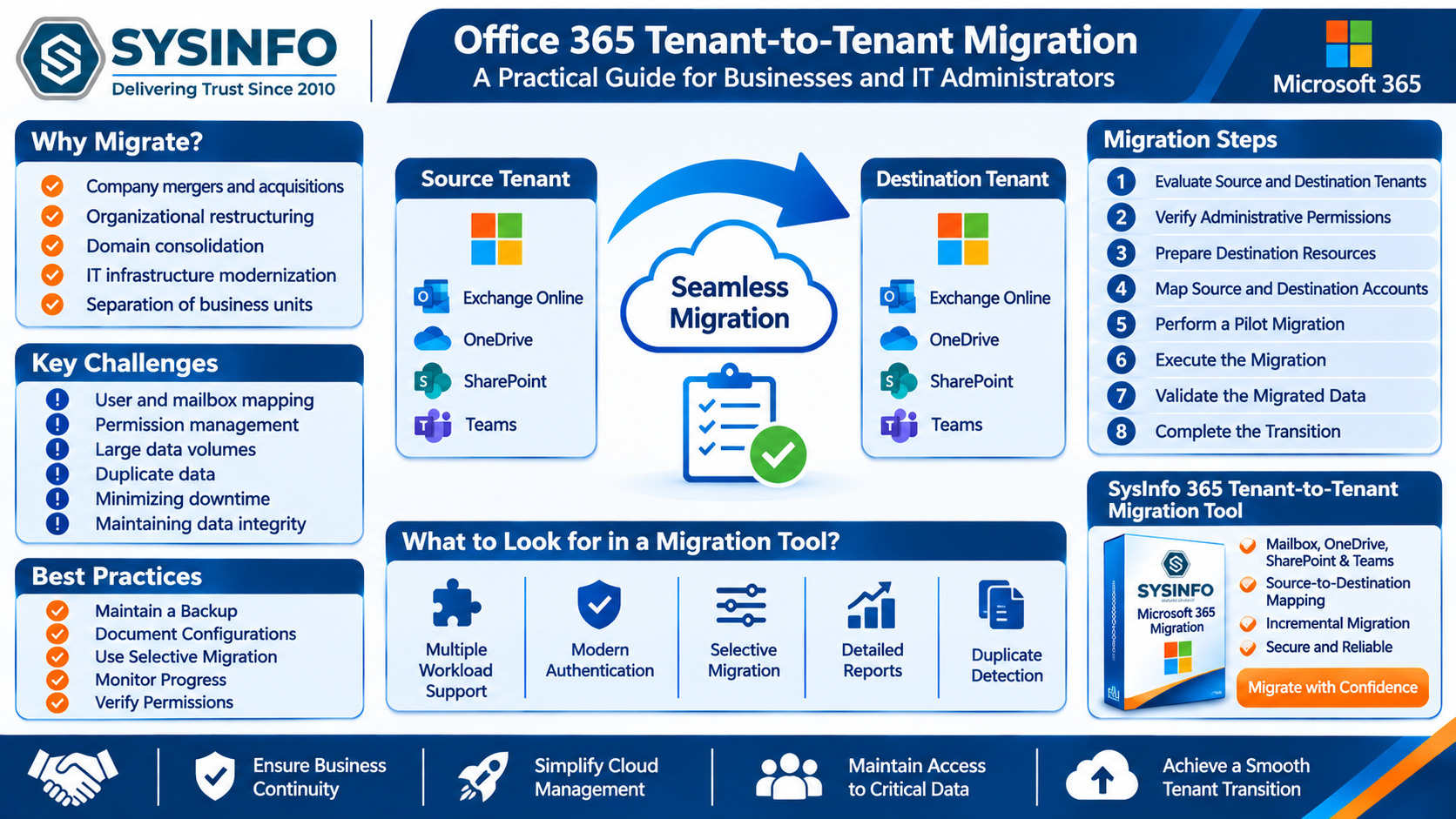
Microsoft 365 has become an essential platform for organizations managing business emails, documents, team collaboration, and cloud-based workflows. However, as companies expand, restructure, acquire new businesses, or change their IT infrastructure, they may need to move their existing Microsoft 365 data from one tenant to another. This process is known as Office 365 tenant-to-tenant migration.
Unlike a regular mailbox transfer, tenant migration involves moving multiple types of business data while maintaining accessibility, organization, and operational continuity. Administrators must consider Exchange Online mailboxes, OneDrive accounts, SharePoint sites, Microsoft Teams conversations, permissions, and user identities before starting the migration.
A properly planned migration helps businesses consolidate their cloud environments, simplify administration, and maintain access to important organizational information.
What Is Office 365 Tenant-to-Tenant Migration?
Office 365 tenant-to-tenant migration is the process of transferring Microsoft 365 data from one organizational tenant to another. Each Microsoft 365 tenant operates as a separate environment with its own users, domains, licenses, security configurations, and administrative settings.
Organizations typically perform this migration when they need to combine multiple Microsoft 365 environments or move business operations to a newly established tenant.
The migration process can involve several Microsoft 365 services, including:
Exchange Online mailboxes, emails, contacts, calendars, and attachments.
OneDrive files, folders, and supported metadata.
SharePoint sites, document libraries, and lists.
Microsoft Teams channels, messages, files, and supported collaboration data.
Shared mailboxes and online archives.
User accounts, mailbox mappings, and supported permissions.
The primary objective is to move the required information into the destination environment without unnecessarily disrupting everyday business activities.
Why Do Organizations Need Microsoft 365 Tenant Migration?
There are several business and technical situations where transferring Microsoft 365 data between tenants becomes necessary.
1. Company Mergers and Acquisitions
When two organizations merge, they may operate separate Microsoft 365 tenants. Maintaining multiple environments can increase administrative complexity and make collaboration difficult.
Consolidating their Microsoft 365 data into a common tenant helps establish centralized management and simplifies access to business information.
2. Organizational Restructuring
Large organizations sometimes reorganize their departments, subsidiaries, or regional operations. As a result, employees and their associated cloud resources may need to move between different tenants.
A structured migration helps administrators transfer the relevant mailboxes, files, and collaboration data according to the new organizational structure.
3. Domain and Tenant Consolidation
Businesses operating multiple Microsoft 365 tenants may decide to bring their cloud infrastructure under one administrative environment. This can simplify user management, licensing, security policies, and resource administration.
4. IT Infrastructure Modernization
Companies upgrading their cloud infrastructure may create a new Microsoft 365 tenant with updated configurations. Moving existing data into the new environment allows them to reorganize resources while retaining important business records.
5. Separation of Business Units
When a subsidiary or department becomes an independent organization, its employees and associated Microsoft 365 data may need to move into a separate tenant.
In this situation, selective migration becomes particularly important because administrators may only need to transfer specific users, mailboxes, and collaboration resources.
Major Challenges During Office 365 Tenant-to-Tenant Migration
Moving information between two Microsoft 365 tenants involves more than copying files and emails. Differences in tenant configurations, permissions, and resource ownership can create several technical challenges.
User and Mailbox Mapping: Source and destination tenants have separate user identities. Administrators must correctly map existing mailboxes to their corresponding destination accounts to avoid transferring information to the wrong users.
Permission Management: SharePoint sites, OneDrive folders, and shared mailboxes may have different permission structures. These settings require careful attention because permissions may not transfer identically across every migration scenario.
Large Data Volumes: Organizations with hundreds of mailboxes and terabytes of cloud storage need an organized migration strategy. Network bandwidth, file sizes, API limitations, and processing capacity can affect the migration timeline.
Duplicate Data: Multiple tenants may contain identical emails, documents, or attachments. Transferring everything without duplicate detection can unnecessarily increase storage consumption.
Business Downtime: Employees depend on Microsoft 365 for daily communication and collaboration. Poorly planned migration activities can interrupt access to important information.
Data Integrity: Maintaining folder structures, attachments, timestamps, metadata, and supported permissions is essential when transferring business-critical information.
Addressing these challenges before migration can significantly improve the overall process.
Essential Steps for a Successful Microsoft 365 Tenant Migration
A systematic approach helps administrators reduce errors and maintain better control over the migration process.
Step 1: Evaluate the Source and Destination Tenants
Begin by examining both Microsoft 365 environments. Identify the number of users, mailboxes, SharePoint sites, OneDrive accounts, and Teams resources that need to be transferred.
Prepare an inventory of the required information and identify any inactive accounts, duplicate content, or unnecessary data.
Step 2: Verify Administrative Permissions
Ensure that the migration administrator has the required permissions in both environments. Check Microsoft Entra ID configurations, application permissions, authentication settings, and multi-factor authentication requirements.
For application-based authentication, verify that the required API permissions and consent have been configured correctly.
Step 3: Prepare Destination Resources
Create the required destination user accounts and assign appropriate Microsoft 365 licenses.
Destination mailboxes, SharePoint sites, and OneDrive accounts should be available before transferring their corresponding data. Also, verify that sufficient storage is available in the target environment.
Step 4: Map Source and Destination Accounts
Create a mapping between the source users and destination users. This step is particularly important when email addresses or user principal names differ between tenants.
Review the mapping carefully before starting a large migration.
Step 5: Perform a Pilot Migration
Instead of immediately transferring all organizational data, begin with a small group of users or selected resources.
A pilot migration helps administrators evaluate authentication, data transfer, folder structures, permissions, and destination accessibility.
Step 6: Execute the Migration
Once the preparation and testing stages are complete, begin transferring the selected Microsoft 365 resources.
Depending on organizational requirements, administrators can migrate mailboxes, OneDrive files, SharePoint content, and Teams data in separate phases.
Step 7: Validate the Migrated Data
After migration, verify the destination environment.
Check mailbox folders, email attachments, calendar entries, SharePoint libraries, OneDrive files, and Teams resources. Review migration reports and investigate any failed or skipped items.
Step 8: Complete the Transition
Once the transferred data has been verified, communicate the changes to employees and update the relevant administrative configurations.
Maintain access to the original environment until the organization has confirmed that the required information is available in the destination tenant.
What Should You Look for in an Office 365 Tenant Migration Tool?
Choosing suitable migration software can make complex migration projects easier to manage. However, administrators should evaluate the technical capabilities of a solution before selecting it.
Important features include:
Multiple Workload Support: The software should support the required Microsoft 365 components, including Exchange Online, OneDrive, SharePoint, and Teams.
Modern Authentication: OAuth 2.0 authentication and multi-factor authentication compatibility help administrators manage secure access.
Source-to-Destination Mapping: Accurate user and resource mapping reduces the possibility of transferring data to incorrect accounts.
Incremental Migration: The ability to skip previously migrated items helps reduce unnecessary data processing during subsequent migration runs.
Duplicate Detection: Duplicate identification helps maintain cleaner destination environments and optimize storage.
Selective Migration: Date-based, file-size, and file-extension filters provide greater control over which information gets transferred.
Migration Reports: Progress monitoring and detailed reports help administrators identify failed, skipped, or completed migration tasks.
Data Preservation: The solution should maintain supported folder structures, attachments, metadata, and permissions.
Evaluating these capabilities before beginning a migration helps IT teams select a solution that matches their organizational requirements.
Simplifying the Process with a Dedicated Microsoft 365 Migration Solution
For organizations handling complex tenant consolidation projects, a dedicated migration application can provide additional control over the transfer process.
The SysInfo Microsoft 365 Tenant-to-Tenant Migration Tool(https://www.sysinfotools.com/o365-tenant-to-tenant-migration.php) is designed to transfer supported Microsoft 365 data between tenants. It supports Exchange Online mailboxes, SharePoint sites, OneDrive files, and Microsoft Teams data.
The application provides source-to-destination mapping, incremental transfers, duplicate detection, and selective migration options. It also supports PST and OST mailbox restoration to Office 365.
Its authentication capabilities include OAuth 2.0 and Modern Authentication. Data transfers between source and destination tenants use TLS-encrypted HTTPS connections for supported workflows.
Administrators can also use date-range filters, file-size filters, and file-extension filters to control the migration scope. Live progress tracking and migration reports help monitor the process and identify exceptions.
The application is available for Windows and macOS, making it an option for IT professionals managing different Microsoft 365 migration requirements.
Best Practices for Reducing Migration Risks
Even with suitable migration software, preparation remains an important part of every tenant migration project.
Consider the following practices:
Maintain a Backup: Keep an independent backup of critical business information before making major changes to the source environment.
Document Existing Configurations: Record user accounts, permissions, mailbox settings, and important SharePoint structures.
Prioritize Critical Users: Identify departments and employees whose information must be transferred first.
Avoid Unnecessary Transfers: Use selective migration options to exclude irrelevant or outdated information.
Monitor Migration Progress: Review logs and reports regularly rather than waiting until the entire process is complete.
Verify Permissions: Check access to migrated mailboxes, documents, and collaboration resources.
Plan Incremental Transfers: Where supported, use subsequent migration passes to transfer newly added or updated information.
These practices help IT administrators maintain better visibility and control throughout the migration lifecycle.
Conclusion
Office 365 tenant-to-tenant migration is an important part of cloud infrastructure management for businesses undergoing mergers, acquisitions, restructuring, or IT modernization. Successfully transferring Microsoft 365 information requires careful planning, accurate account mapping, appropriate authentication, and thorough post-migration verification.
By understanding the technical challenges and following a structured migration strategy, organizations can move their business information into a new Microsoft 365 environment with greater control and fewer disruptions.
For IT administrators managing multiple Microsoft 365 workloads, selecting a suitable migration solution can simplify the process of transferring mailboxes, SharePoint sites, OneDrive files, and Teams data while maintaining the required data organization.